In this article
Writing a work email at a B2 level often stalls on tone rather than grammar. Everyday B1 words can sound too blunt when you are chasing a late invoice or pushing back on a deadline, while C1 or C2 vocabulary can read like a legal contract.
When I built VocabZ, I included CEFR-graded word lists from A1 to C2 alongside a personal collection tool because workplace English sits right across those boundaries. This guide sets out practical B2 words and short phrases by email function, followed by how I would organise and review them inside the app without turning your inbox into a memorisation chore.
Core B2 words for updates, requests, and constraints
At B2 (upper-intermediate), the most useful workplace words do specific jobs: they explain why a plan changed, ask for something clearly, or set a boundary politely. Rather than learning twenty disconnected verbs at once, group them by the kind of email you actually write.
| Email job | Word or collocation | Meaning in context | Example line |
|---|---|---|---|
| Timelines | schedule / reschedule | Plan a time, or move an agreed time | Could we reschedule Tuesday’s call to Thursday afternoon? |
| Timelines | postpone | Delay something to a later date | We need to postpone the release until testing finishes. |
| Progress | outcome | The final result of a meeting or process | Please share the outcome of the client review when you can. |
| Requests | clarify | Make an unclear point easier to understand | Could you clarify whether the budget covers travel costs? |
| Requests | confirm | State officially that something is agreed | Please confirm that the revised figures match your records. |
| Constraints | feasible | Possible to achieve with current time or resources | Delivering both pages by Friday is not feasible for our team. |
| Constraints | priority | Something treated as more urgent than other tasks | Fixing the login issue is our main priority this week. |
| Follow-ups | outstanding | Still remaining to be paid, answered, or completed | There are two outstanding questions on the draft contract. |
Notice that none of these words are rare. Their value at B2 is precision: outstanding says “still unfinished” cleanly, and feasible explains a limit without sounding defensive.
Phrases that soften tone without sounding stiff
Single words rarely fix an awkward email on their own. Most B2 friction comes from abrupt openings, direct demands, or dated textbook expressions such as “Herewith please find attached.” Short, natural phrases carry the tone you want.
Opening and giving context
- Following up on…: Connects your message to an earlier thread. “Following up on our call earlier today, here is the updated timeline.”
- With regard to…: Introduces a specific topic cleanly. “With regard to the invoice from March, we noticed a duplicate line.”
- Just to keep you in the loop: Shares a quick status note when no reply is needed. “Just to keep you in the loop, the supplier expects delivery on Monday.”
Making requests and handling delays
- Would it be possible to…: Softens a request for a change or favour. “Would it be possible to move our deadline by forty-eight hours?”
- I would appreciate it if you could…: Polite but firm when you need an action. “I would appreciate it if you could sign the form before noon.”
- Due to… / As a result of…: Explains a delay neutrally without blaming anyone. “Due to a supplier delay, the shipment will arrive next Tuesday.”
- Please let me know if…: Leaves room for the other person to adjust. “Please let me know if another time slot suits you better.”
A useful rule of thumb is to keep each email to one main request and one clear next step. If a sentence feels too formal to say aloud on a call, simplify it before hitting send.
Organising your email list by CEFR level in VocabZ
Once you have ten or fifteen words and phrases from real work messages, the next problem is keeping them organised so you actually revisit them. I recommend splitting your practice between the built-in Vocab List and your own My Collection.
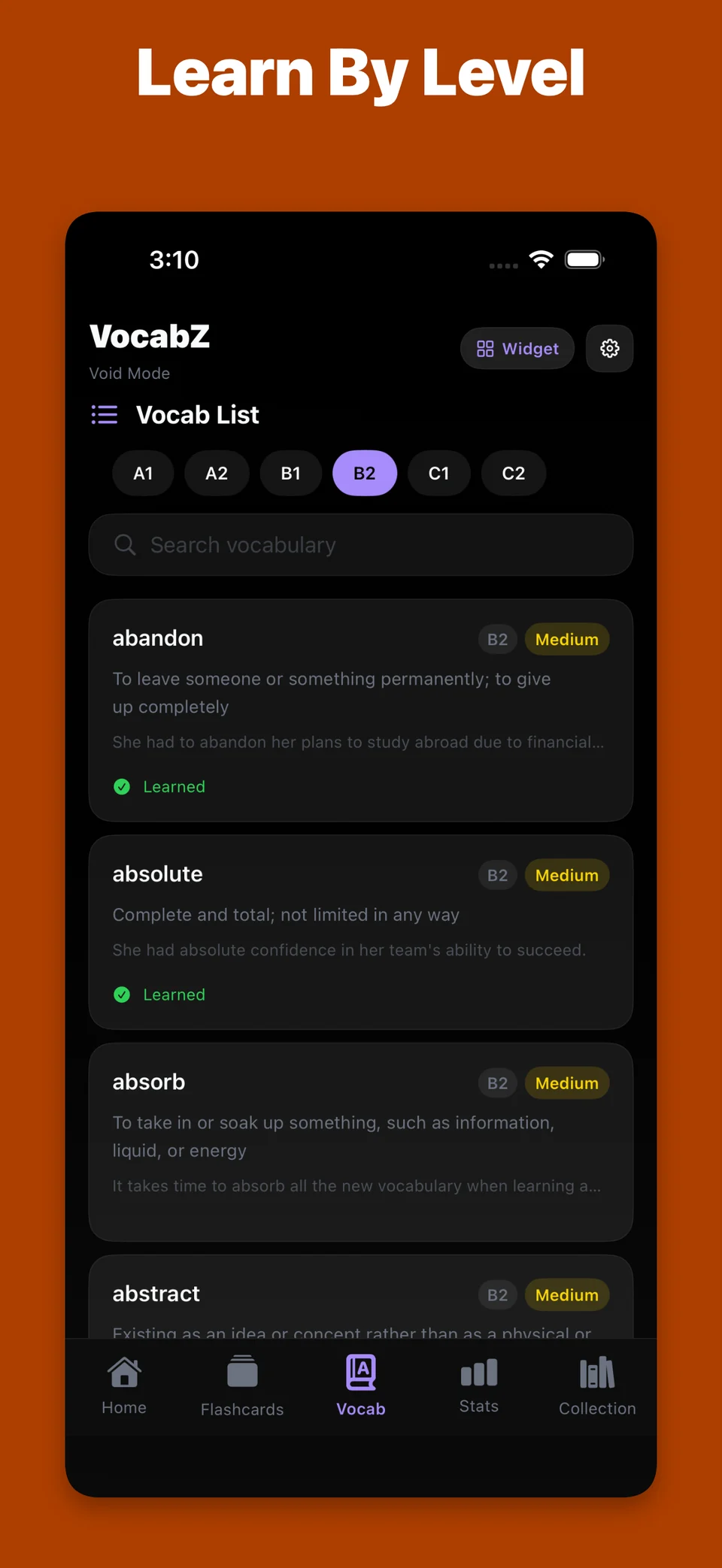
- Browse B1 and B2 in Vocab List: Start with the B2 list for core verbs and adjectives like clarify or feasible, and check B1 if a common work word still feels hesitant. Each entry includes a definition, example sentence, part of speech, synonym, and antonym.
- Save workplace phrases in My Collection: Use Add new word in My Collection for the exact phrases you use at work. Tag each entry with a broad category such as Work Emails and assign a CEFR level (usually B2) so your personal list stays searchable.
- Write your own email sentence: Instead of copying a generic dictionary line, put a real sentence from your job in the example field. Seeing your own context makes recall much easier when you are drafting under time pressure.
- Check pronunciation with Read Aloud: In Flashcards, tap Read Aloud to hear a word in British, American, Australian, or Indian English before using it on a live call.
VocabZ schedules reviews with spaced repetition at 3, 7, 14, and 30 days when you answer correctly, and brings back words you miss sooner. You can read how those return intervals work in the spaced repetition interval guide, or see my notes on capturing real-world expressions in saving words from books and podcasts. Regular review supports recall, though no app can promise a specific exam score or workplace outcome.
Access limits and where to start
VocabZ 2.0 is free to download with ads and offers an optional one-time VocabZ Pro purchase that removes ads and unlocks every feature. Because the released 2.0 listing does not specify exact numeric free limits for every level or custom entry, check the in-app access screen before planning a large custom deck.
If you want to try this today, pick five words from the table above, add two phrases from your last sent email to My Collection, and run one short Flashcards or Quiz Mode session. You can find the full feature list and App Store link on the VocabZ app page.