In this article
Pausing a Netflix episode every few minutes to look up an unfamiliar word ruins the pace of the story, yet letting the dialogue roll past means you forget the expression before the credits finish. The practical workaround is separating capture from study: jot the word down in seconds while watching, then move the best two or three into VocabZ after the episode ends.
VocabZ does not connect to Netflix or import subtitles automatically, so everything starts with what you choose to notice yourself. When I built My Collection and Flashcards in VocabZ 2.0, the aim was to give those stray words from everyday watching a proper place to live, paired with pronunciation and spaced review rather than sitting in an untouched notes app.
During the episode: capture without breaking the scene
The biggest mistake people make when watching shows for English practice is treating an episode like a textbook. If you stop every time a character uses an unfamiliar idiom or phrasal verb, watching turns into a chore and you stop doing it altogether. I keep the capture step deliberately rough: a single word or short phrase in a scratch note, or a quick timestamp if subtitles are on, with no attempt to write a definition mid-scene.
Not every unknown word is worth keeping. A rare medical term in a hospital drama or a piece of period slang in a historical series rarely helps your own speech. Focus on expressions that made you miss the point of a line, or phrases you can picture yourself saying in conversation or at work. Two or three candidates per episode is plenty.
After the credits: turn rough notes into clean entries
Once the episode finishes, the scene and tone are still fresh in your mind, which makes that five-minute window the best time to open VocabZ. Go to My Collection and tap to add a new word. Because you heard the word in dialogue, you already know whether it sounded formal, sarcastic, or casual—context that a bare word list never gives you.
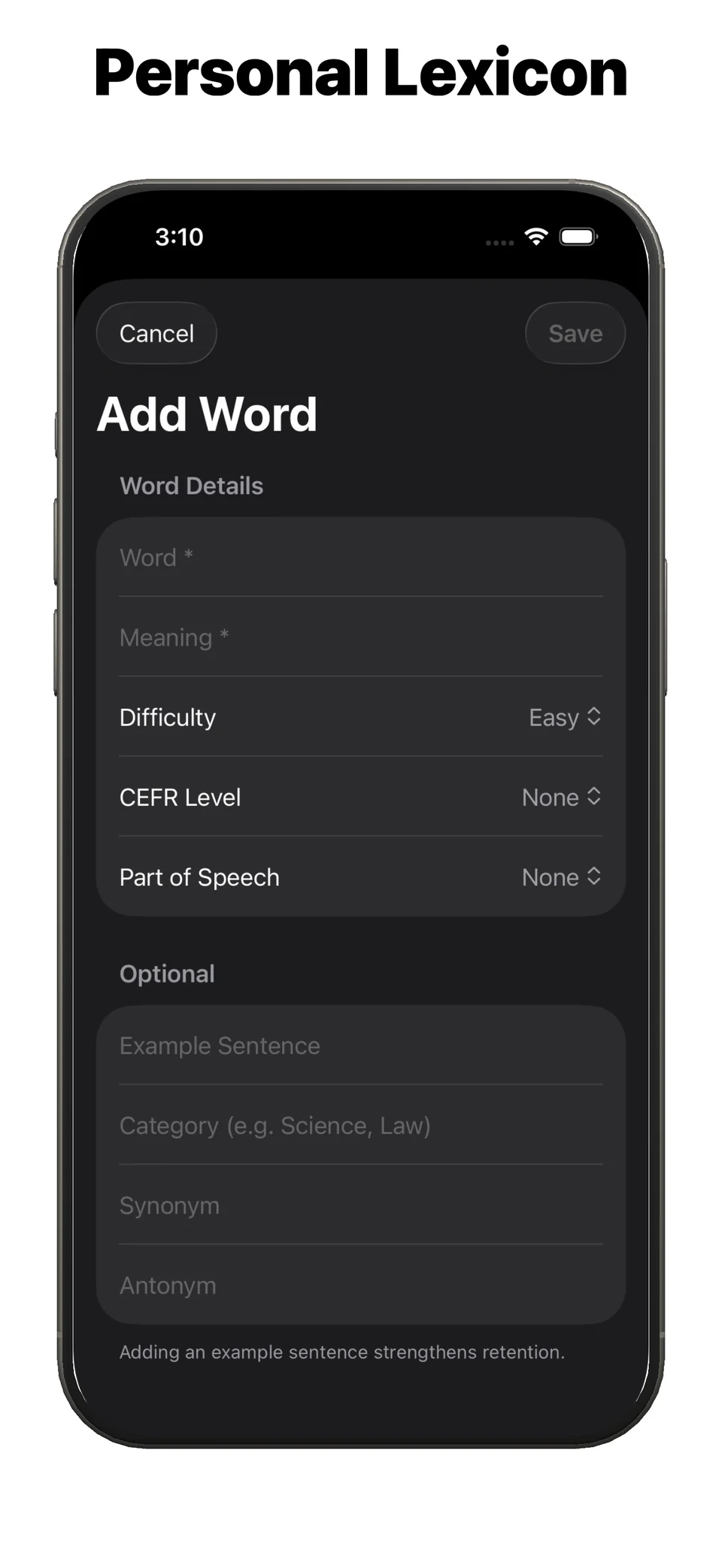
When filling in the form, keep the definition in plain English that matches the sense used in the show. Many common English words shift meaning completely depending on the situation, so copying the first dictionary line without checking can mislead you later. Add a short example sentence of your own—either adapted from the scene or placed in an everyday situation you might actually face—and fill in the part of speech so you remember how the word behaves in a sentence.
The optional fields—category, difficulty, CEFR level, synonym, and antonym—are there if they help you organise, not as a checklist you must complete every night. Giving your TV words a simple category such as "Dialogue" or "Everyday phrases" keeps them easy to find without creating a separate folder for every series you watch. If you are unsure of a synonym or CEFR level, leave it blank rather than guessing.
The next day: review with Flashcards and Read Aloud
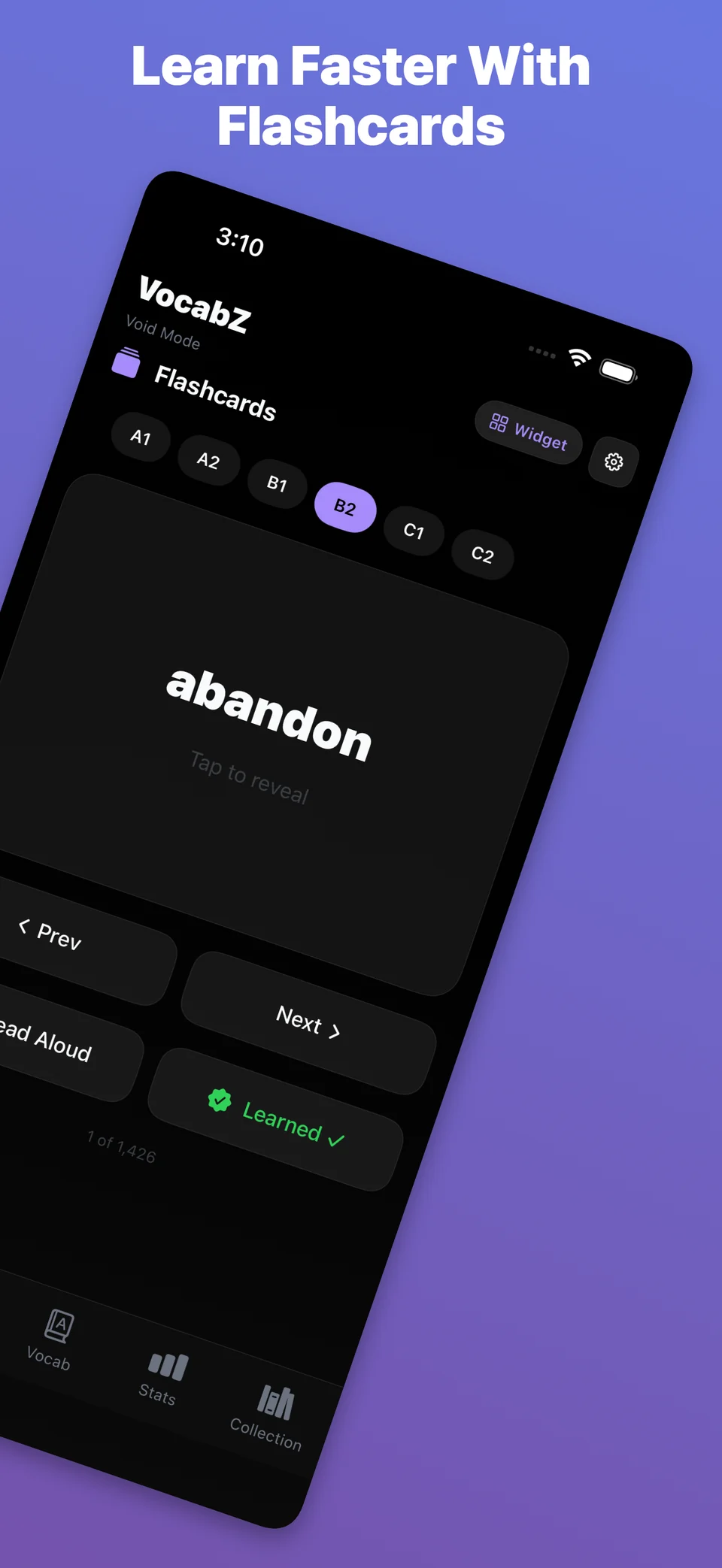
Saving a word feels productive, yet passive collecting fades quickly if you never test yourself. The real habit happens the following day, perhaps over morning coffee or on a commute, when you open Flashcards to face the words you saved the night before.
Before flipping a card to see the definition and example sentence, pause and try to recall both the meaning and the moment in the show where you heard it. That brief effort—even when you only remember half the sense—is what separates active recall from simply recognising a familiar spelling. Once you flip the card, check the part of speech and read your example sentence aloud.
Because television dialogue moves fast and relies heavily on regional speech, hearing the word again helps lock in how it sounds. VocabZ includes Read Aloud with multiple English accents, including British, American, Australian, and Indian voices. If you picked up a phrase from a British drama or an American sitcom, switching to the matching accent lets you hear the word cleanly without background music or overlapping actors. For a closer look at how those voice options differ, read comparing VocabZ pronunciation accents.
From there, let VocabZ's spaced repetition handle the timing. In the released 2.0 engine, words you answer correctly return at wider intervals—3 days, 7 days, 14 days, and 30 days—while words you miss come back sooner. You can also mix in a quick Quiz Mode round (a 10-second timer with four choices that puts due words first) or Survival Mode when you want a stricter streak check, though unhurried Flashcards usually suit newly captured dialogue best. You can read more about how those return gaps work in the spaced repetition intervals guide.
Keep the queue lighter than your watchlist
A show habit only lasts if the review queue stays manageable. If you watch three episodes in an evening and save fifteen words, your Flashcards session the next morning will feel heavy before it begins. Setting a personal cap—say, no more than three words per episode—forces you to pick the expressions you genuinely want to own and keeps daily review down to a few minutes.
If you miss a couple of evenings and your due words pile up, pause adding new words from shows until you clear what is already in My Collection. VocabZ also includes official CEFR-graded lists from A1 to C2 in the Vocab List, plus a Daily Challenge and Stats tracking your streak and accuracy, so your personal show words sit alongside structured study rather than replacing it.
Access limits and getting started
VocabZ 2.0 is free to download with ads, and offers an optional one-time VocabZ Pro purchase that removes ads and unlocks every feature. The released App Store listing does not specify exact numeric free limits for every action or level, so check the in-app access screen on your device if you plan to build a large custom list. Remember that regular practice supports your learning, though no app can guarantee exam scores or permanent recall on its own.
If you want to try this workflow with your next episode, you can check compatibility and download links on the VocabZ app page.